
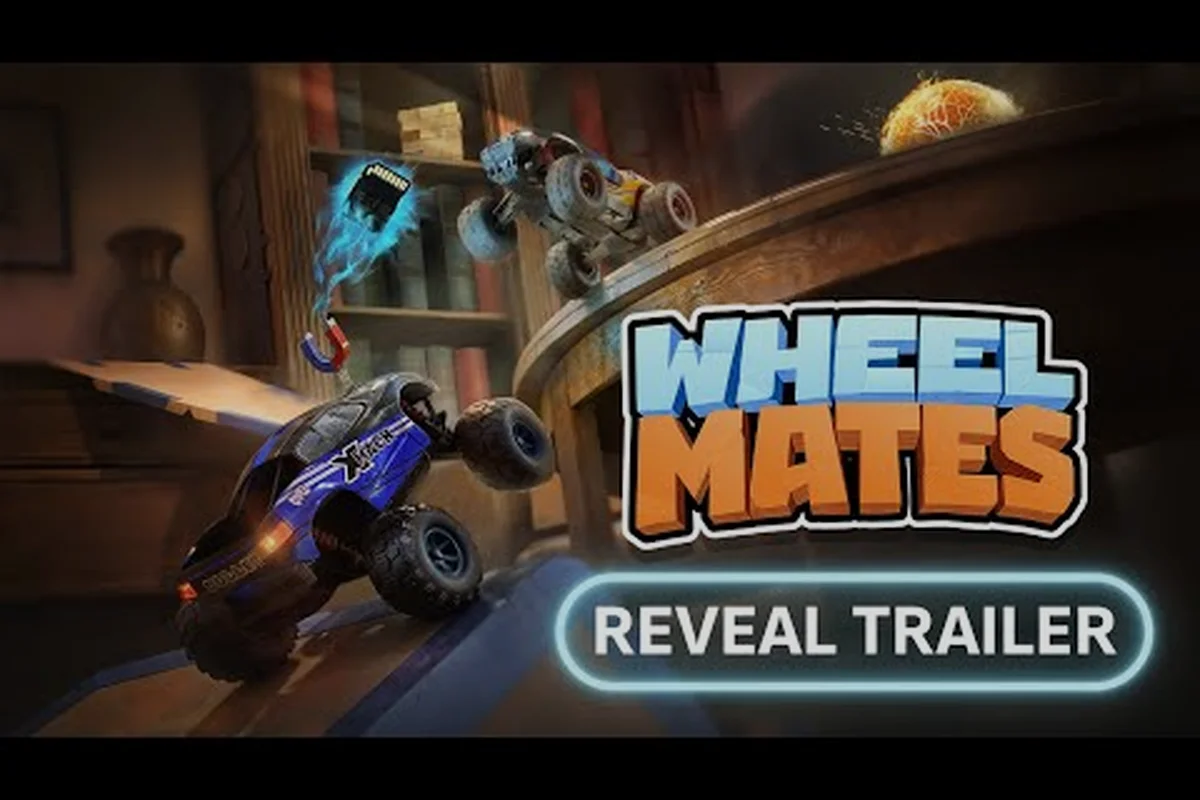
WheelMates é uma aventura cooperativa de carrinhos RC da Firevolt que coloca você e um amigo no laboratório caseiro de um professor, onde objetos do dia a dia se tornam obstáculos gigantescos. Este guia iniciante de WheelMates cobre o essencial: como jogar, o que esperar na primeira hora e as dicas iniciais que evitarão que você vire dentro de um aquário. Com o jogo sendo lançado na Steam em 1º de setembro de 2026, familiarizar-se com as mecânicas agora significa que você e seu parceiro cooperativo podem começar com tudo em vez de tropeçar pelo tutorial.
O ciclo principal é simples: você dirige pequenos carrinhos RC por uma casa em escala gigante, resolve quebra-cabeças baseados em física e balança em cordas para alcançar novas áreas. Mas o verdadeiro desafio vem da coordenação, porque a maioria dos quebra-cabeças exige que ambos os jogadores ajam juntos. Se você está se perguntando como começar, este guia aborda os controles, o sistema cooperativo, o Passe de Amigo e os erros mais comuns que novos pilotos cometem. Além de evitar essas armadilhas iniciais, aprimorar seu trabalho em equipe é o que separa jogadas tranquilas das frustrantes, então mergulhe em nossas Melhores Dicas de WheelMates para estratégias avançadas de coordenação que se baseiam no básico que você acabou de aprender.
Primeiros Passos no WheelMates: O Que Esperar na Sua Primeira Sessão
Sua primeira sessão no WheelMates começa no laboratório caseiro do professor, um espaço bagunçado que serve tanto como hub quanto como tutorial. O trailer oficial de anúncio mostra as mecânicas de balanço de corda e a jogabilidade cooperativa para dois jogadores, e o trailer da data de lançamento confirma que o jogo será lançado na Steam em 1º de setembro de 2026. Isso é mais cedo do que o alvo original de 7 de setembro, então os desenvolvedores da Firevolt estão claramente confiantes na versão.
Antes de mergulhar, aqui está o que você precisa saber:
-
Plataforma: PC via Steam, com uma demo que estava disponível durante o período de pré-lançamento.
-
Foco cooperativo: O jogo é projetado para dois jogadores, embora as discussões da comunidade Steam mostrem um tópico ativo sobre suporte para um jogador, então o modo solo é um tema de conversa em andamento.
-
Passe de Amigo: Um jogador pode hospedar e convidar um amigo que não possui o jogo, semelhante ao sistema "Passe de Amigo" usado por outros títulos cooperativos. Relatos da comunidade sugerem que isso funciona bem, mas o jogador convidado pode ter um rastreamento de progresso limitado.
-
Duração da sessão: As fases iniciais são curtas, cerca de 10 a 15 minutos cada, tornando-o um ótimo jogo para sessões rápidas ou jogatina prolongada.
O ciclo principal envolve dirigir seu carrinho RC até um objetivo, mas o caminho nunca é uma linha reta. Você precisará empurrar objetos, puxar alavancas e coordenar com seu parceiro para abrir portas ou ativar plataformas. O motor de física é intencionalmente exagerado, então os carrinhos podem capotar, quicar e lançar-se de maneiras que parecem caóticas, mas são na verdade previsíveis depois que você entende o sistema de peso.
WheelMates Como Jogar: Mecânicas Principais e Controles
Entender os controles é o primeiro passo em qualquer plano de primeiros passos no WheelMates. O jogo usa uma configuração padrão de dois manípulos, mas o segredo é dominar a mecânica de impulso e o balanço de corda.
O Esquema de Controle de Dois Manípulos
| Ação | Controle | Notas |
|---|---|---|
| Dirigir | Manípulo esquerdo | Movimento de 360 graus |
| Câmera | Manípulo direito | Visão livre, mas cuidado: a câmera pode prender em móveis |
| Impulso | RT / R2 | Consome um medidor de impulso; recarrega quando parado |
| Balanço de Corda | A / Cruz | Requer um ponto de ancoragem de corda; timing é tudo |
| Pular | B / Círculo | Usado para pequenos obstáculos e para cruzar lacunas |
| Interagir | X / Quadrado | Apertar botões, pegar objetos, ativar interruptores |
O manuseio da câmera é um dos tópicos mais discutidos na comunidade Steam, com jogadores relatando que ela pode estar "realmente quebrada" em espaços apertados. A câmera vai atravessar paredes e móveis, dificultando a visualização do seu carrinho. Uma solução prática é manter a câmera em um ângulo mais alto e evitar dirigir sob mesas baixas até se acostumar com a perspectiva. Este é um erro comum de iniciante, e vale a pena ajustar a sensibilidade da câmera nas configurações antes de começar.
A Mecânica de Balanço de Corda
O balanço de corda é o movimento característico do WheelMates. Você verá cordas penduradas no teto, e agarrar uma permite que você crie impulso e solte para voar sobre lacunas. O segredo é soltar no ápice do seu balanço, o que lhe dá a maior distância. Se você soltar muito cedo, vai cair antes; muito tarde, e você vai balançar de volta na parede. Pratique na primeira corda do laboratório, que é uma área de baixo risco com uma aterrissagem suave.
Sistema Cooperativo do WheelMates: Passe de Amigo e Noções Básicas de Trabalho em Equipe
WheelMates é construído em torno do cooperativo, e o Passe de Amigo é o recurso mais importante para iniciantes porque permite que você experimente o jogo com um amigo sem exigir que ele o compre. De acordo com as discussões da comunidade Steam, o Passe de Amigo funciona de forma semelhante a outros títulos cooperativos, onde o anfitrião possui o jogo e o amigo entra de graça. No entanto, existem algumas limitações que os novos jogadores devem conhecer.
| Recurso | Jogador Anfitrião | Jogador com Passe de Amigo |
|---|---|---|
| Posse do Jogo | Necessária | Não necessária |
| Progresso | Salvo localmente | Não salvo (relatado por jogadores) |
| Conquistas | Desbloqueadas | Desbloqueadas (com base em relatos da comunidade) |
| Chat de Voz | No jogo | No jogo |
O chat de voz no jogo é uma adição legal, mas a comunidade Steam notou que pode ser pouco confiável, então muitos jogadores usam o Discord. Se você estiver jogando com um amigo no mesmo teclado, precisará reatribuir as teclas, porque a configuração padrão não suporta dois jogadores em um teclado. Esta é uma reclamação comum na comunidade, e as opções de reatribuição de teclas estão disponíveis no menu de configurações.
Como Funcionam os Quebra-Cabeças Cooperativos
A maioria dos quebra-cabeças no WheelMates exige que ambos os jogadores ajam simultaneamente. Por exemplo, um jogador pode precisar segurar um botão enquanto o outro dirige por um portão. Isso significa que a comunicação é essencial. O balanço de corda também é usado no cooperativo, onde um jogador balança para uma plataforma e então solta uma corda para o outro subir. O motor de física torna esses quebra-cabeças divertidos porque os carrinhos têm peso, e você precisará levar em conta o momento ao empurrar objetos.
Dicas Iniciais do WheelMates: Evitando Erros de Iniciante
Todo guia iniciante de WheelMates deve cobrir os erros que novos jogadores cometem, e a comunidade identificou vários padrões. O primeiro é dirigir muito rápido. O medidor de impulso é tentador, mas usá-lo constantemente vai deixá-lo sem impulso quando você mais precisar. O segundo é ignorar a câmera. Como mencionado, a câmera pode atravessar objetos, então você precisa ajustá-la manualmente para evitar se perder.
Os 5 Principais Erros de Iniciante
-
Usar impulso em excesso: O medidor de impulso recarrega, mas leva tempo. Guarde-o para pulos e subidas.
-
Pular as cordas do tutorial: O balanço de corda requer prática. Passe 5 minutos na primeira corda antes de prosseguir.
-
Jogar sozinho sem testar o cooperativo: O jogo é projetado para dois jogadores. Se você estiver sozinho, perderá a experiência principal.
-
Não reatribuir as teclas: Se estiver no mesmo teclado, reatribua as teclas antes de começar. O layout padrão não é confortável para dois jogadores.
-
Ignorar o ambiente: A casa do professor está cheia de objetos que você pode empurrar, puxar e usar. Não dirija direto para o objetivo.
A Correção da Câmera
O problema da câmera é a reclamação mais comum na comunidade Steam, e vale a pena abordá-lo em uma seção dedicada. A câmera é uma câmera "de seguir" que pode prender em móveis, e o jogador relatou que ela está "realmente quebrada" em certos pontos. Uma correção prática é usar o manípulo direito para girar manualmente a câmera ao entrar em uma nova sala. Você também pode ajustar a distância da câmera nas configurações, o que ajuda a ver mais do ambiente.
WheelMates para Iniciantes: Tipos de Quebra-Cabeças e Progressão
Os quebra-cabeças no WheelMates são baseados em física e ficam progressivamente mais complexos à medida que você avança pela casa do professor. Os primeiros quebra-cabeças são simples: empurre uma caixa até um local marcado ou acione um interruptor para abrir uma porta. Quebra-cabeças posteriores exigem que você use o balanço de corda em combinação com o sistema de impulso, e alguns quebra-cabeças são projetados apenas para dois jogadores.
Tipos de Quebra-Cabeças
| Tipo de Quebra-Cabeça | Descrição | Dificuldade |
|---|---|---|
| Empurrar e Puxar | Mover objetos para locais específicos | Fácil |
| Ativação de Interruptor | Acionar um interruptor para abrir uma porta ou plataforma | Fácil |
| Balanço de Corda | Usar a corda para cruzar lacunas | Médio |
| Coordenação Cooperativa | Ambos os jogadores devem agir simultaneamente | Médio |
| Lançamento Físico | Usar rampas e impulso para lançar sobre obstáculos | Difícil |
A progressão é linear, mas o jogo incentiva a exploração. A casa do professor está cheia de colecionáveis, e a comunidade relatou que a demo tinha vários itens escondidos. O jogo completo provavelmente tem mais, então vale a pena explorar cada cômodo. Os colecionáveis geralmente são colocados em áreas de difícil acesso, o que significa que você precisará dominar o balanço de corda e o sistema de impulso para pegá-los todos.
Dicas Iniciais do WheelMates: Técnicas Avançadas e Otimização
Depois de dominar o básico, você pode começar a otimizar sua jogatina. O sistema de impulso é a ferramenta mais importante para speedrunning, e o jogador descobriu que você pode encadear impulsos aterrissando em uma rampa no ângulo certo. O balanço de corda também tem uma técnica chamada "balanço duplo", onde você balança em uma corda, solta e imediatamente agarra a próxima corda para manter o momento.
A Tabela de Gerenciamento de Impulso
| Cenário | Uso do Impulso | Tempo de Recarga |
|---|---|---|
| Terreno plano | Baixo | Rápido |
| Subida | Alto | Lento |
| Balanço de corda | Médio | Médio |
| Rampa de lançamento | Alto | Lento |
O manuseio da câmera também é uma habilidade. Em vez de lutar contra a câmera, você pode usá-la a seu favor. Quando estiver em um local apertado, gire a câmera para uma visão de cima para baixo para ver toda a área. Isso é especialmente útil para os quebra-cabeças de física, onde você precisa ver a rampa e a zona de aterrissagem.
A Estratégia do Passe de Amigo
Se você estiver jogando com um amigo, o Passe de Amigo é uma ótima maneira de testar o jogo antes de comprá-lo. Mas há uma estratégia: use o Passe de Amigo para experimentar as primeiras fases e, se gostar, compre o jogo. O amigo também pode comprar o jogo, e vocês podem continuar o progresso juntos. A comunidade relatou que o Passe de Amigo é uma boa maneira de atrair novos jogadores para o jogo, e é um recurso que mais jogos cooperativos deveriam adotar.
Perguntas Frequentes
O que é o guia iniciante de WheelMates?
O guia iniciante de WheelMates é uma visão geral abrangente das mecânicas principais do jogo, incluindo os controles de dois manípulos, o balanço de corda, o sistema de impulso e o Passe de Amigo cooperativo. Ele é projetado para ajudar novos jogadores a começar rapidamente e evitar erros comuns que levam à frustração nas primeiras horas.
Como jogo WheelMates com um amigo?
Você pode jogar WheelMates com um amigo usando o Passe de Amigo, que permite que um jogador convide um amigo que não possui o jogo. O amigo pode entrar na sua sessão e jogar de graça, embora o progresso possa ser limitado. Alternativamente, ambos os jogadores podem comprar o jogo e jogar juntos, que é a maneira recomendada de experimentar todo o conteúdo cooperativo.
WheelMates é jogável no modo single player?
WheelMates é projetado como um jogo cooperativo, mas a comunidade Steam tem um tópico ativo sobre suporte para um jogador. O jogo pode ser jogado no modo solo, mas os quebra-cabeças são projetados para dois jogadores, então alguns desafios serão muito mais difíceis. O desenvolvedor não confirmou oficialmente um modo dedicado para um jogador, então jogadores solo devem esperar uma experiência mais difícil.
Quais são as melhores dicas iniciais de WheelMates?
As melhores dicas iniciais de WheelMates são: não use o impulso em excesso, aprenda o balanço de corda cedo, mantenha a câmera em um ângulo alto e comunique-se com seu parceiro cooperativo. Além disso, reatribua suas teclas se estiver no mesmo teclado e explore a casa do professor em busca de colecionáveis. Essas dicas ajudarão você a evitar os erros mais comuns de iniciante.
Quando WheelMates será lançado?
WheelMates será lançado na Steam em 1º de setembro de 2026. A data de lançamento foi adiantada do alvo original de 7 de setembro, e o jogo está disponível para pré-compra na Steam. O trailer oficial de anúncio e o trailer da data de lançamento estão disponíveis no YouTube, e o canal do TikTok tem filmagens curtas de jogabilidade para uma rápida olhada no jogo.